Key Takeaways
- Authority scores far above real organic traffic are the first warning sign to check, because DA and DR are built from links, not readers.
- Outbound links in nearly every post, off-topic anchors and thin articles suggest a site exists to sell links rather than serve readers.
- Private blog networks leave footprints: shared themes, recycled About pages, the same link targets and domain histories that do not match the content.
- One flag is a reason to ask questions; two or three together are a reason to walk away.
Guest post red flags are the warning signs that a site sells links more than it serves readers, and spotting them before you pay is the cheapest protection a link builder has. Three risks sit behind most of them: private blog networks, link farms and inflated metrics.
Each can leave you with a placement that sends no visitors and carries little weight. A link from a site built mainly to pass links may simply stop counting, and you will not get a notice when it does.
This checklist groups the warning signs into four families: the numbers, the content, network footprints and the sales pitch. For each one you get a free way to confirm it, so you can judge a site on evidence rather than on a seller’s promise.
In This Guide
- What Guest Post Red Flags Really Signal
- Guest Post Red Flags in the Numbers
- Red Flags in the Content and Outbound Links
- Footprints That Point to a Private Blog Network
- Sales Pitches That Should Make You Pause
- A Guest Post Red Flags Checklist With Free Tools
- When One Red Flag Is Not a Deal Breaker
- Guest Post Red Flag Questions Buyers Ask
What Guest Post Red Flags Really Signal
Most guest post red flags point back to one of three problems, and knowing which one you are looking at tells you how serious the risk is.
- Private blog networks (PBNs): groups of sites under one owner, often built on expired domains, that exist mainly to pass links to paying clients or to the owner’s own sites.
- Link farms: Wikipedia describes a link farm as a group of websites that all link to other sites in the group to raise search rankings. Many buyers also use the term for blogs that publish almost anything for a fee.
- Inflated metrics: sites whose authority scores or traffic figures were pushed up with manipulated links or short-lived traffic, so the numbers look better than the audience.
Why this matters to you: Google’s post on its December 2022 link spam update says SpamBrain can detect both sites buying links and sites used to pass outgoing links, and that credit passed by unnatural links is lost as they are neutralized. A paid placement on a network site can lose its value quietly.
Guest Post Red Flags in the Numbers
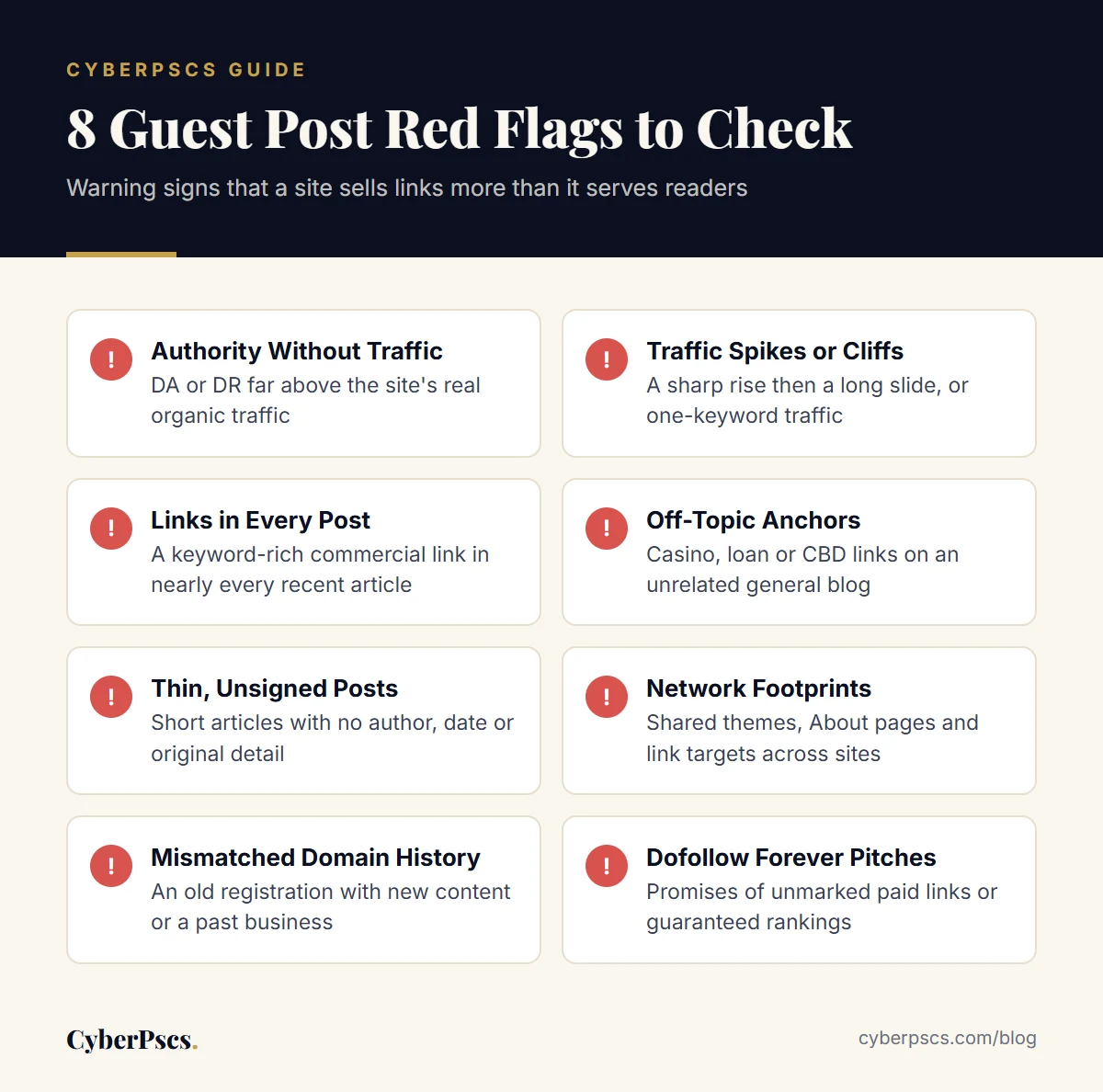
Authority Far Above Real Traffic
DA and DR are calculated from link data, not from visitors. When a site shows a DA or DR in the 50s but its organic traffic estimate sits in single or double digits, the links have not turned into readers. Ask why before you pay. Our guide to DA vs DR explains what each score does and does not measure.
Traffic Spikes, Cliffs and Single-Keyword Traffic
Look at a year of traffic history, not one month. A sharp climb followed by a long slide can mean a site gained visibility quickly and then lost it. Traffic that comes almost entirely from one keyword is fragile too: one lost ranking and the audience is gone. Neither pattern proves wrongdoing, but both mean the headline number may not last.
Many Backlinks From Few Domains
Compare total backlinks with referring domains. Thousands of links from a few dozen domains often means sitewide footer or sidebar links, and Google’s spam policies list widely distributed links in the footers or templates of various sites as an example of link spam. Open the backlink report and see who is linking before you trust the total.
A Spam Score That Asks Questions
Moz’s Spam Score is the percentage of sites with similar features that Moz found penalized or banned by Google. Moz treats 1% to 30% as low and says a higher score is a reason to investigate, not proof of spam. Read it next to the other signals on this list.
Red Flags in the Content and Outbound Links
Numbers can be gamed. Content-based guest post red flags are harder to fake, so read before you buy.
Outbound Links in Nearly Every Post
Open ten recent posts and count the external links in each. On a site run for readers, links point to sources, tools and references that help the article. On a site run for link sales, almost every post carries one commercial link with a keyword-rich anchor, often in the first paragraph. Google’s reminder about links in large-scale article campaigns lists stuffing keyword-rich links into articles among the factors that, taken to an extreme, can indicate a violation.
Off-Topic Anchors on a General Blog
Anchors for casinos, payday loans or CBD on a site that claims to cover home decor or travel suggest the site sells to anyone. Your brand would sit next to those links, and a reader who sees them has little reason to trust the page.
Thin, Undated or Unsigned Posts
Short articles with no author, no date and no original detail suggest volume matters more than quality. The same Google post names writers who are not knowledgeable about their topics, and the same or similar content across many articles, among its warning factors. If recent posts read like rewrites of each other, expect your article to be treated the same way.
Categories That Cover Everything
A general blog is fine on its own, but a category list that runs from crypto to pet care to wedding dresses, each with a few posts, usually means the site takes any paid topic. For a better fit, see why niche guest posting beats raw authority.
Footprints That Point to a Private Blog Network
A single PBN site can look normal. The pattern shows when you compare it with its neighbors.
- Identical templates: the same theme, layout and widgets across several sites that link to each other or to the same clients.
- Recycled About and Contact pages: near-identical text, stock photos, or one contact email shared across domains.
- The same outbound targets: different sites linking to the same handful of commercial pages with similar anchors.
- A history that does not match the content: a domain registered years ago whose posts only start recently, or old snapshots that show a different business on the same name.
- Hidden ownership: no named editor, no company details and no way to reach a real person.
Check the registration date with ICANN Lookup, then compare it with the oldest post on the site and with snapshots in the Internet Archive’s Wayback Machine. Google’s spam policies describe expired domain abuse as buying an expired domain and repurposing it primarily to manipulate search rankings with content that provides little to no value to users. A domain’s age helps only if the current site has earned it.
Sales Pitches That Should Make You Pause
Sellers often reveal more than their sites do. Be careful when you hear any of these:
- Dofollow forever, no sponsored tag. Google’s spam policies say buying links for advertising is not a violation when the links are qualified with rel=”sponsored” or rel=”nofollow”. A seller promising unmarked paid links is offering what the policy describes as link spam.
- Guaranteed DA or ranking results. Nobody controls Google’s rankings, and authority scores belong to Moz and Ahrefs, not to the seller.
- Bulk packages across dozens of sites. The 2017 Google post also warns about articles published across many different sites as part of large-scale link building.
- Any topic, same price, published within hours. A site that never asks whether your article fits its readers is not vetting anyone else’s either.
- No real data on request. An owner with genuine readers can usually share a Search Console screenshot or an analytics export.
Our guide on whether guest posting is safe under Google’s link rules covers how paid placements should be labeled.
A Guest Post Red Flags Checklist With Free Tools
Use these checks to confirm or rule out guest post red flags. Most take a few minutes and none needs a paid subscription.
| Red Flag | Free Way to Check | What to Look For |
|---|---|---|
| Authority without traffic | Compare DA or DR with an organic traffic estimate; ask the owner for Search Console data | Scores in the 40s or higher with traffic near zero |
| Traffic spikes or cliffs | Review a year of traffic history in a free tool trial or the owner’s analytics | A sharp rise and a long slide, or traffic from one keyword |
| Links in every post | Open ten recent posts; right-click links and choose Inspect to read the rel attribute | A keyword-rich commercial link in nearly every post |
| Off-topic anchors | Search Google for site: plus the domain and words like casino, loans or CBD | Gambling, loan or CBD links on an unrelated blog |
| Network footprints | View the page source and compare themes, About pages and outbound targets across sites | Shared templates, text or link targets |
| Mismatched history | ICANN Lookup plus the Wayback Machine | An old registration with new content, or a past unrelated business |
| Indexing problems | Search site: with the domain, then the exact title of a recent post | Recent posts missing from results |
A directory can do part of this for you. Every listing in the CyberPscs guest post directory shows DA, DR, US organic traffic, keywords, spam score and domain age side by side, and our verification method explains where each number comes from.
When One Red Flag Is Not a Deal Breaker
Guest post red flags need context. A new site may have little traffic because it is new, not because it is a network. A site written for readers in another country can show tiny US traffic and still have a real audience. Seasonal topics rise and fall every year.
A simple rule keeps your decisions consistent:
- One flag: ask the owner about it and request evidence.
- Two flags: continue only if the answers and data are convincing.
- Three or more: walk away, however good the price or the scores look.
For the full process of building and vetting a shortlist, read how to find guest post sites worth paying for, then compare candidates by subject, starting with our business guest post sites.
Guest Post Red Flag Questions Buyers Ask
What are the main guest post red flags to check?
Start with authority scores far above real organic traffic, a commercial link in nearly every post, off-topic anchors such as casino or loan links on a general blog, thin unsigned articles and sellers who promise unmarked dofollow links. None proves a problem on its own, but each deserves a question before you pay.
How can I tell if a guest post site is part of a PBN?
Compare it with the sites it links to and the sites linking to it. Shared themes, recycled About pages, one contact email and the same commercial link targets across domains suggest common ownership. Check the registration date with ICANN Lookup and compare it with the oldest posts and Wayback Machine snapshots.
Is a high spam score always a warning sign?
Not always. Moz defines Spam Score as the percentage of sites with similar features that it found penalized or banned by Google, and it says a high score is a reason to investigate further, not proof that a site is spammy. Read it next to traffic, outbound links and content quality.
Why would a site with a high DA get almost no traffic?
Domain Authority and Domain Rating are built mainly from link data, so a site can earn strong scores without ranking for searches people make. The gap can come from manipulated links, lost rankings, a young site or an audience outside the country your tool measures. Ask the owner for Search Console data before paying.
Should I avoid sites that sell dofollow links?
Be cautious. Google’s spam policies say paid links are not a violation when they carry rel=sponsored or rel=nofollow, but paid links that pass ranking credit count as link spam. A site that promises unmarked paid links is selling what the policy targets, and those links can be neutralized without notice.
Guest post red flags rarely appear alone. A site with inflated scores often has thin posts, busy outbound links and a seller who promises more than anyone can deliver. Check the numbers, read the content, look for network footprints and listen to the pitch, and you will filter out most risky placements before they cost you anything.
Want a head start? Browse verified guest post sites with their metrics side by side, or ask us about a placement that fits your niche.